Master On-Set Power: A Filmmaker’s Guide to the CinePower Calculator
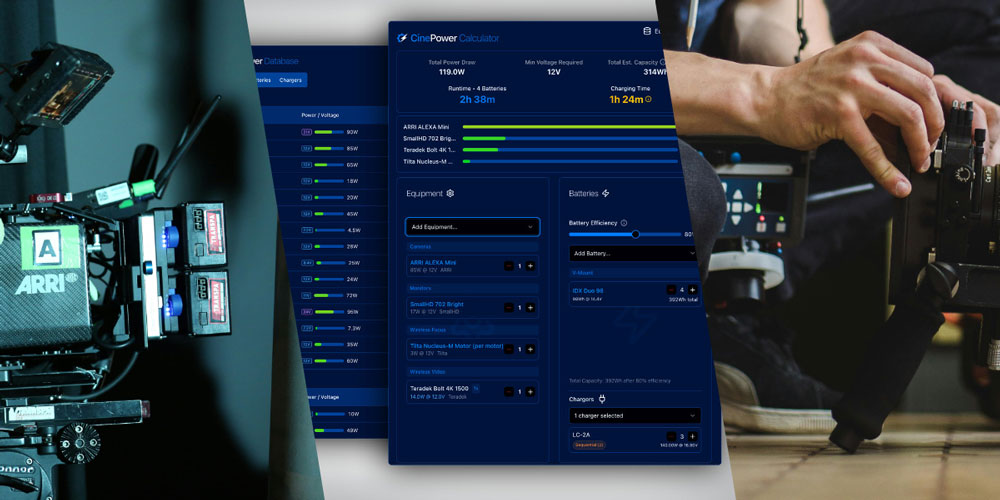
The scene’s set, the talent’s ready, the light’s golden… and then the last charged battery runs out. Nearly everyone has one of these nightmares at least once—either while sleeping, or actually on set. On a fast-paced New York City run-and-gun shoot, a sudden power issue can be a massive blunder, eating through daylight and budget with every second.

Filming in the Mojave Desert with a few wireless accessories, the LED mat on the ceiling utilizes the same V-mount batteries in our kit that we’re using for the two cameras. How many batteries will we need?
As a DP, I’ve learned that on-set power is one of the most critical yet overlooked parts of production. Get the “battery math” wrong, and things can turn grim quickly—with a bit of recourse if you’re in the middle of Manhattan, but with very annoying consequences out in the middle of nowhere. And while the smaller cameras are really battery-efficient these days, the big boys and pro-level accessories remain power-hungry.
This is a thing to remember when figuring out a custom package: the power draw doesn’t just come from the body—in a narrative environment, cameras like the ARRI Alexa 35, RED Komodo or Sony FX3 are usually always operated with one or multiple high-brightness monitors, wireless video transmitters, remote follow focus systems, and plenty of other gear that draws power. And while the usual approach of “just get plenty of batteries” is fine, with small budgets or air travel, every rental dollar and watt-hour gets scrutinized; infinite batteries aren’t always possible.
That’s why I built the CinePower Calculator —to take the guesswork out of “how many batteries will I need on this shoot?” This guide will walk you through how to use it so you can plan power the smart way.
What is the CinePower Calculator and Why Did We Build It?
At its core, the CinePower Calculator is a free, web-based tool our team and I developed to accurately calculate the runtime of an entire production-grade, accessorized camera package. It was born from my own frustrations with 15 years of gut feeling, guesswork that I used to estimate on-location power management. For any AC, Cam Op, or DP out there, it’s the ultimate camera battery usage calculator, and the only one of its kind.
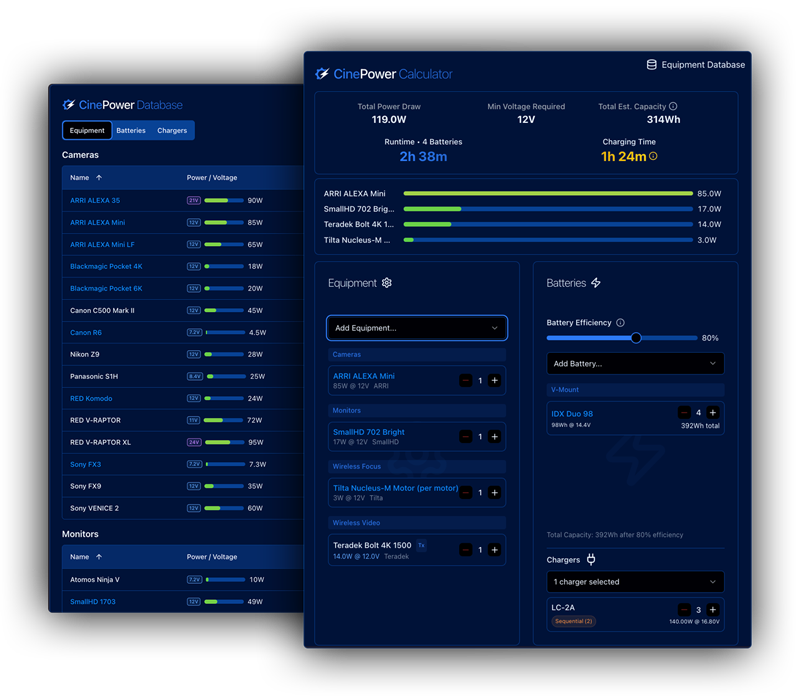
The CinePower Calculator.
For too long, we’ve relied on rough estimates, hoping we have enough batteries to last the day. This tool replaces that gut feeling with hard data. Especially for location shoots where charging batteries might involve sending the camera PA in a vehicle back to base camp—sometimes in a gator with a bunch of departments competing for valuable transport space on a sandy bluff—knowing how many batteries and chargers you need to do the dance is vital.
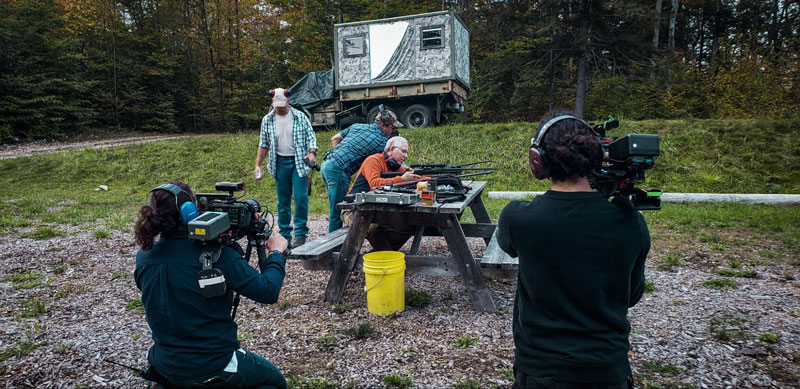
Shooting on a shooting range deep in the Vermont forests in a vérité travel.
CinePower Calculator Walkthrough: From Prep to Wrap
The calculator is designed to become a straightforward core part of your pre-production checklist. We’ve built a full example CinePower Calculator configuration for you, and below you can follow along step-by-step on how to build it:
Step 1: Build Your Camera Package
First, select your camera from the dropdown menu. Let’s say you’re prepping an ARRI Alexa Mini.
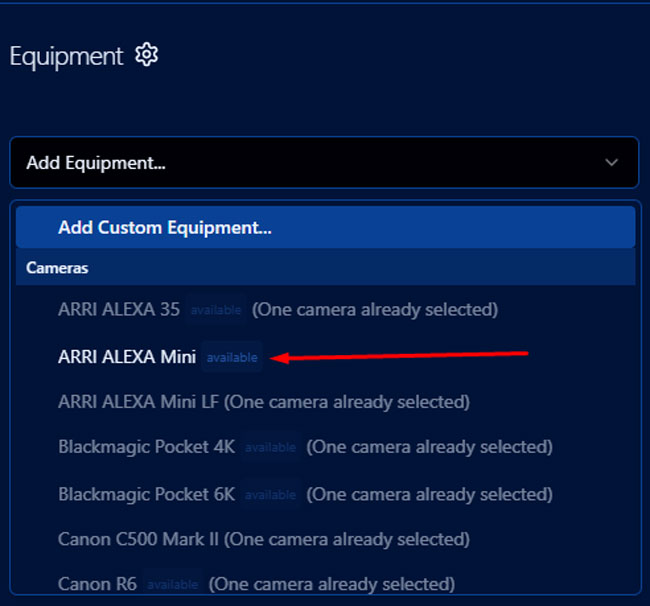
Choosing the ARRI Alexa Mini from the built-in list.
Next, add every single accessory that draws power; don’t leave anything out. This includes your wireless video transmitter, electronic follow focus, high-brightness monitor, and any other attached gear. If there are accessories you’re using that aren’t on our list yet—like a rangefinder—you can add them as custom items.
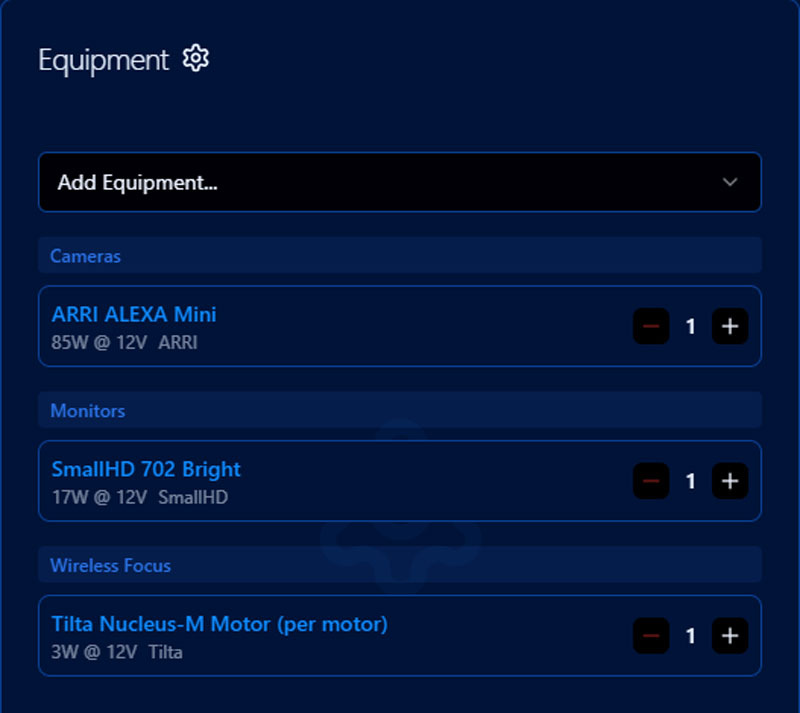
CinePower Calculator Equipment List Section.
Some accessories will draw more power than the camera body itself if you use small cameras like the FX3. Our database features a complete list of the best cameras for indie filmmaking and many common accessories, but you can also punch in custom cameras that we don’t have listed yet.
Step 2: Add Your Batteries
Next, input your battery specs into the calculator. Whether you’re using V-mounts, Gold mounts, or block batteries, you can pick from our pre-vetted list or create a custom one; just put in their voltage and watt-hours (e.g., 14.8V, 98Wh).
The battery efficiency slider depends on a number of factors we’ll talk about later; for brand new batteries at room temperature you can pick 100%; for rental batteries in varied environments, 80% is a good starting point. More about the underlying physics further down in the article.
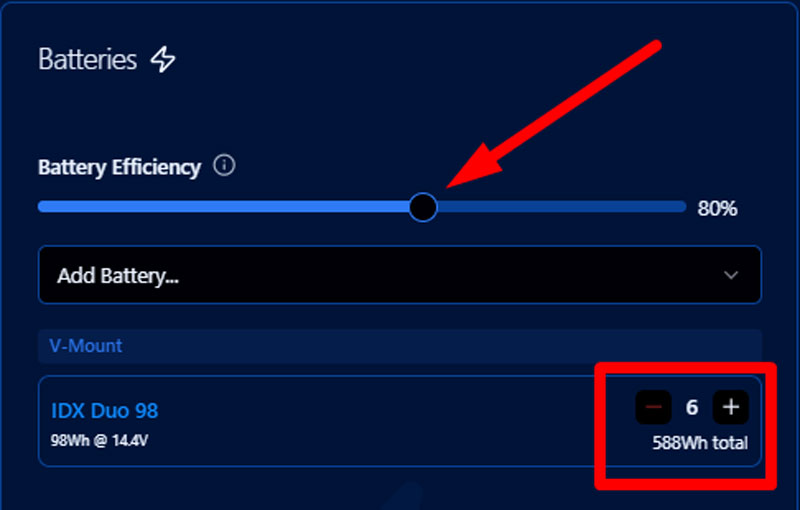
CinePower Calculator Batteries Section.
Sticking with the Alexa Mini example, and let’s assume we have an indie budget, I went ahead and added six (6) IDX Duo 98Wh batteries.
Step 3: Analyze the Results
With your package built and batteries selected, the calculator instantly provides the two most important metrics:
- The total power draw of your entire setup in watts (W).
- The projected runtime you can count on from the number of batteries.
This data helps you figure out exactly how long you can shoot before you need to swap out batteries, making your film set power planning precise and predictable. With this camera setup, 6 batteries will give you around 4 hours and 29 minutes of continuous power.
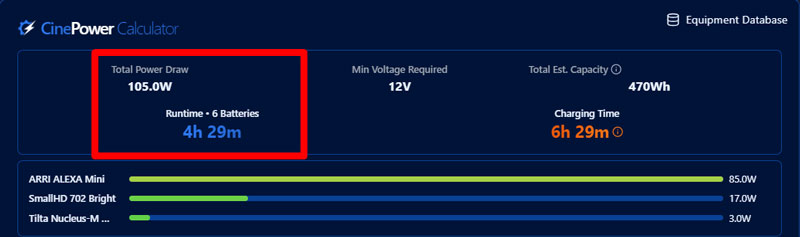
CinePower Calculator Initial Results, showing Total Power Draw, Min. Voltage Required and Total Battery Capacity—next to a wattage draw chart per device.
The calculator also checks for voltage compatibility, showing the “Min Voltage Required” (middle of screen) based on your equipment list’s highest demanding device. This matters because some cameras, like the ARRI Alexa 35, call for a higher 24V power standard, unlike the 12V or 14.4V systems many other cameras, such as the ARRI Alexa Mini or RED Komodo, use.
Even if the A35 comes with a gold mount, most gold mount batteries won’t power it—even with a Sharkfin parallel setup. The Calculator flags this for those tricky shoots where you source the camera body and batteries separately.
It’s better to figure this out with the calculator than to wait until the day before the shoot, or worse. We often get panicked calls from indie producers stranded in Upstate NY who only wanted to rent batteries, or already had them for the A35. As a courtesy, we usually look into these “quilt-style” renters, but the calculator can help you realize this on your own if a rental house is less attentive. Let’s move on.
Step 4: Chargers—Your Plan for Continuous Power
This step figures out the ideal number of batteries and chargers for continuous operation throughout the day. The aim is to always have a fully charged pack ready before the on-rig battery runs out, ensuring smooth swaps and uninterrupted power.
Let’s take our ARRI Alexa Mini setup. We have 6 batteries total, and we’re hot-swapping with a sharkfin to run two batteries at once. So, 4 batteries and 2 more swaps remain. Two batteries give you about 1 hour and 30 minutes of shooting. So now the key question is—can I charge them faster than I swap them? This is where the chargers section comes in handy.
Add Your Chargers:
In the calculator, go to the “Chargers” section and add the charger(s) you’ll have on set. This activates the “Charging Time” calculation. We picked out the VL-4SE, which works with the IDX Duo 98Wh, and it charges four batteries at once. We also threw in the VL-2X to charge all six batteries overnight when we’re not shooting.
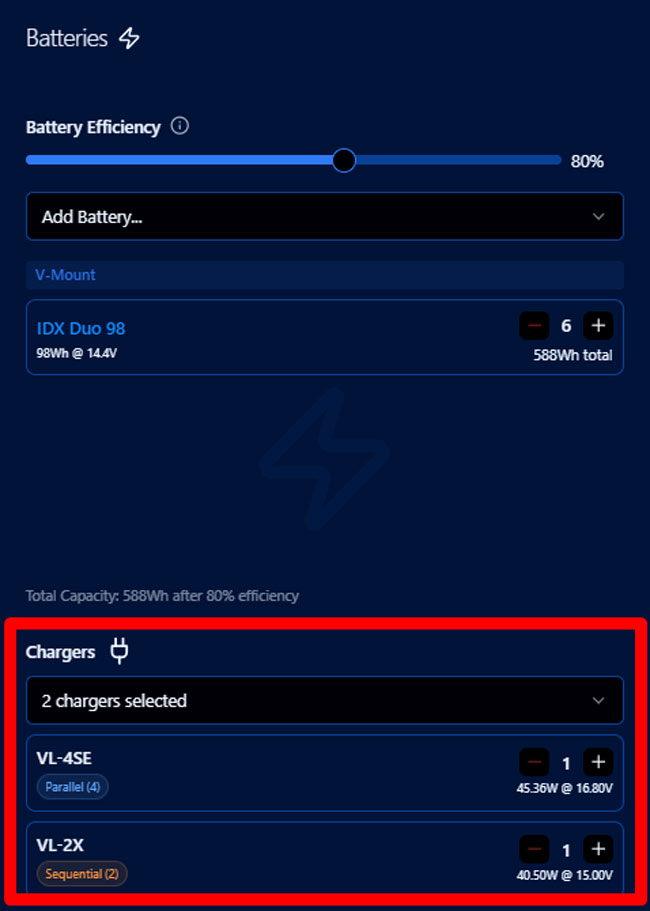
Selecting a charger.
These chargers—only featuring five active ports at any given time since the second charger is serial—will fully recharge all six batteries in about 4 hours and 50 minutes—meaning, they’d take longer to charge than we can use them. We depict this lack of charging power with an orange color in the charge time—it’s insufficient for multiple cycles, so we’ll come up short.
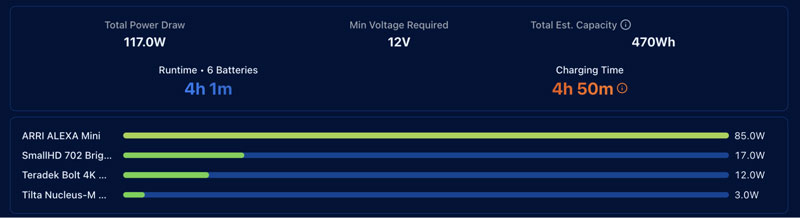
The charging time indicator in contrast to the runtime indicator.
If we only used four batteries and just the 4-port parallel charger by itself, we’d get a shorter total runtime, but the charge time would jump into the “safe” zone with a yellow color since each battery has its own dedicated charging port.
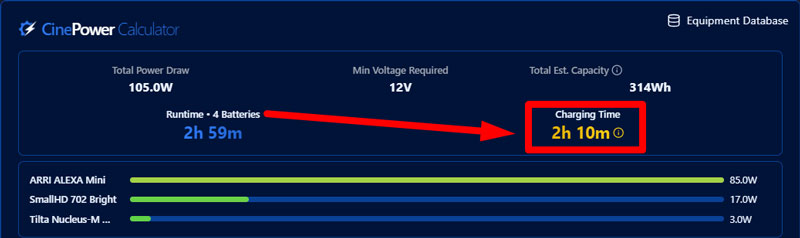
Running through different battery counts provides a look at how charging times compare.
By comparing these numbers, you can instantly see if your charging strategy can keep up with your shoot’s demands. And technically, since in the case of 6 batteries, 2 would always be on the camera and 4 would be charging, we’d be in the safe zone in all these scenarios—but it’s good to be prepared, i.e., if 4 start off empty because an overnight charge was interrupted or a similar happenstance.
Step 5: Print or Export to PDF
Once you’ve planned your camera rig, batteries, and chargers, you can hit the export button to download a PDF. If you need to try out a different camera or multiple setups, just clear the calculations using “reset” and start over—and you can share your setup using the “Share” button. More on that later.
The “Battery Efficiency” Slider: Accounting for Reality
Ever had a battery die way faster than you expected on a shoot in the cold? Or an old battery just didn’t hold up? Both are scientific in nature, and the reason I included a “Battery Efficiency” slider in the CinePower Calculator. It factors in science, experience, and even a gut feeling about how a battery will actually perform.
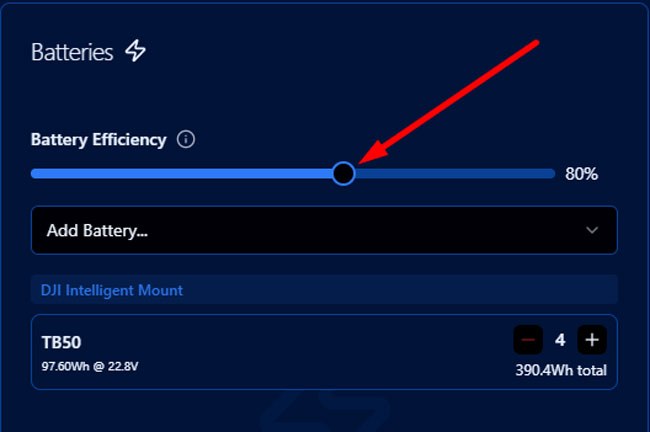
The battery efficiency slider.
This feature accounts for several factors that can run down battery life. These include extreme operating temperatures, heat loss from power conversion (i.e., voltage transform), and battery age. By far, temperature is the biggest factor.

Lithium battery capacity and voltage loss over temperature gradients. Chart by Battery University.
The chart above shows this perfectly—the voltage and capacity drop off a cliff as the temperature gets colder. From a comfortable 25°C / 77°F to a shivering -20°C / -4°F, max voltage drops about 15-20%, and max capacity drops by 47% (!). You can see that the degradation is fairly small from comfortable to freezing point, but once it reaches sub-zero, it drops dramatically.
The Cold Truth: Why Winter Shoots are Power Vampires
You know the feeling. You’re shooting in New York in January, it’s negative 10 Celsius, and your fully charged batteries are dropping like flies. Now—why is the drop below subzero so extreme?
Think of a cold battery like a frozen engine. Everything inside slows down, and the chemical reactions that generate power get sluggish.

Filming with a RED Scarlet in an ice cave in Quebec, CA. 2019.
In simple terms, the cold literally chokes the power out of your batteries. A battery that’s a 100% workhorse at room temperature might only give you 60-75% of its actual power when it’s freezing out.
| Pro Tip: Keep your batteries inside a warm vehicle, or inside a cooler if they have to be outside. Coolers don’t just insulate against the heat in the summer (and cool down contents if you add ice), they can also protect items from freezing inside them in the winter. Adding electric or chemical handwarmer packets can further help to keep batteries in a comfortable environment and maintain their power. |
Once you take the batteries out, keep running the camera—the discharge of power generates heat inside the batteries that helps them not go below freezing. This is particularly powerful when filming with drones in sub-zero temperatures—keeping the batteries warm before the flight extends flight time by more than 50% compared to flying with ice-cold batteries.
The Heat Problem: The Silent Killer of Battery Lifespan
Now, what about heat? This one is less obvious. It feels like your gear is running great in the summer sun, but heat is the silent killer of your battery’s long-term health.
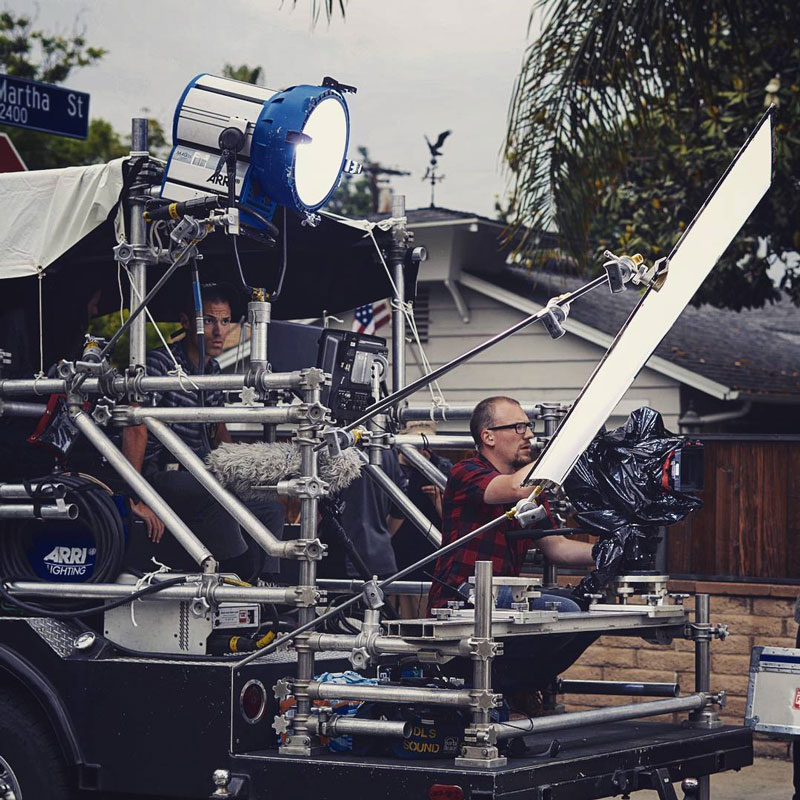
Shooting off a process trailer—yes, we have an onboard generator and can theoretically run the camera off that AC – but what if my Genny is maxed out with my HMI and video village monitor, and I need to go battery only on camera? If it’s an A+B cam, shooting 3 hours of driving all over the place with multiple wireless transmissions, how many batteries will I chew through?
When a battery operates in a hot car or in direct sun, it might give you a slight performance boost (see chart above, higher capacity than at room temperature), but you’re paying for it later. That extra heat accelerates structural degradation, permanently slashing its lifespan. Running a battery at 40°C (104°F) can cut its total lifetime number of charge cycles by a whopping 40%.
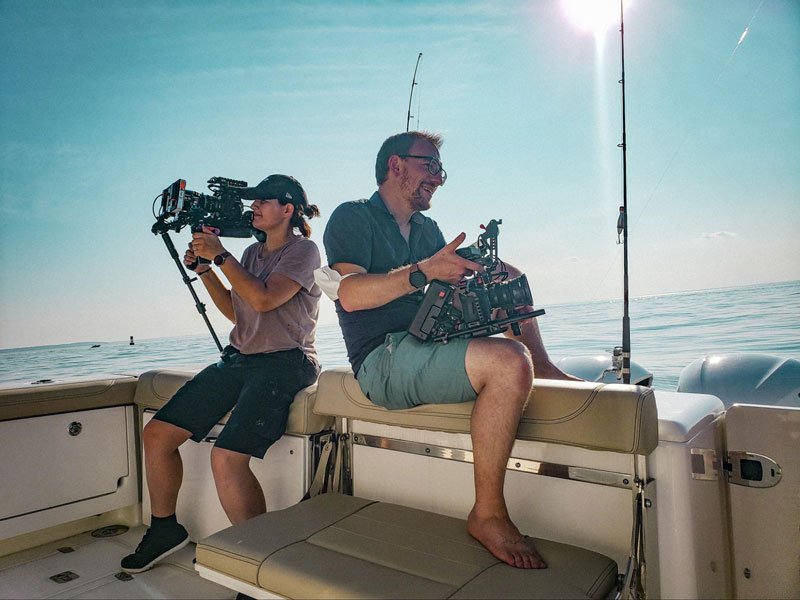
Shooting 2-camera vérité for HBO Max’s “Gaming Wall St” on a boat in Connecticut—there’s onboard power, but just in case, how many batteries should we bring for a 4-hour boat ride in case the onboard outlets aren’t reliable?
Accounting for Age & Temperature
So, back to our calculator interface and how to integrate extreme temperature environments. The “Battery Efficiency” slider lets you translate these real-world conditions into your calculation.
- Shooting in the Catskills in February? Slide that efficiency down to 60-70% to be safe.
- Working with older batteries on a hot day? Maybe dial it back to 80% to account for degraded capacity due to age.
- Working in a climate-controlled studio? You can confidently push it to 85% or 90%.
You must remember this simple rule: Too Hot = Shorter Life, Too Cold = Less Power. Plan for it, and you’ll never be caught by surprise.

Power Planning in the Real World
A tool is only as good as its ability to solve real problems. I’ve been in countless situations where a simple miscalculation could have cost us the entire day. I built the CinePower Calculator for moments just like those—to provide certainty in the most uncertain environments. Here are a few stories from the field where data-driven power planning was non-negotiable.
No Second Chances: The “Gaming Wall St.” Interview
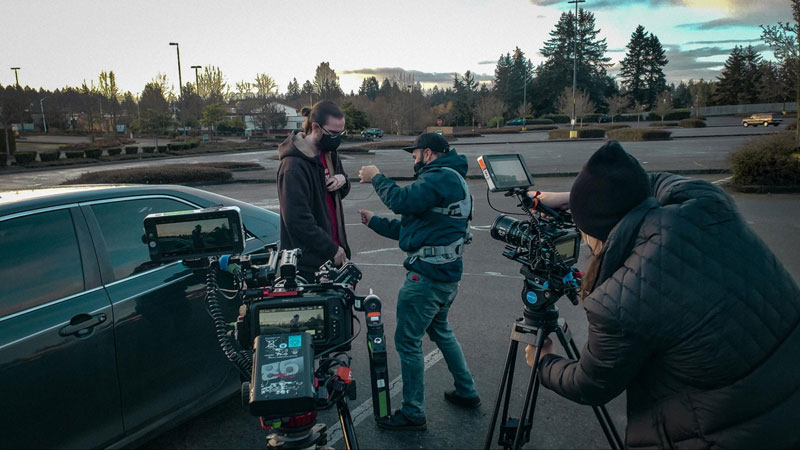
Shooting in a parking lot for a multi-hour documentary interview where we couldn’t lug around a generator or charge batteries in a car due to being a tiny team.
We were filming a multi-hour interview for the HBO Max documentary “Gaming Wall St.” in a parking lot with a subject who lived out of his car. There was no access to grid power and no room for a generator. This was a situation with zero margin for error. We used the calculator to build a power plan that would last for hours, ensuring we could capture the entire story without a single interruption.
High Altitude, Low Temperature: The Rainbow Mountain Commercial

Filming in sub-zero temperatures on horseback in rural Peru.
Shooting a commercial on horseback while ascending Peru’s Rainbow Mountain was a logistical feat. We were surrounded by snow, and the cold was a major threat to our batteries. By dialing down the Efficiency Slider to account for the freezing temperatures, we got a realistic, cautious runtime estimate and knew exactly how much power we needed to carry on the multi-hour ascent—no charging ports available on the mountaintop, but a heated, insulated backpack to slow down our limited payload we could dedicate to batteries.
Airborne Ops: The Helicopter Over Manhattan

Shooting with a Ronin 2 and a RED Scarlet out of a helicopter over Manhattan. This is one of those situations where battery swaps are pretty hard to do.
When you’re shooting out of a helicopter over Manhattan, there are no do-overs and certainly no place to charge a battery. Your flight time is limited and expensive. We had to be 100% certain that our power plan would outlast our time in the air. We had more wireless systems on this shoot; having a reliable calculation would have been invaluable.
No Generators Allowed: The Off-Road Gator

Filming with a Black Arm-mounted MoVI Pro, wireless systems, and Alexa package in Monument Valley.
In National Park locations like Monument Valley, diesel generators are sometimes prohibited because they pose a fire hazard, particularly once you go further off-road. For a bicycle commercial shoot, we had to run our entire camera rig, mounted on a 4×4 off-road buggy, purely on batteries for a 5-hour duration with wild horses and animal trainers. This required meticulous planning to ensure we had enough power for a full day of high-energy shooting. The calculator makes it easy to build that kind of reliable, all-battery workflow, on or off-road.
Quickly Build Custom Camera Rigs
We’ve put together a few more custom setups for you. Check them out using the links below to see how they stack up, how different accessories fit in, which ones have sufficient charging times, and how efficient they are compared to other setups:
- The Alexa 35 Full Production Camera Rig (the hungry camera is matched by a powerful charger)
- The RED Komodo 6K Package (this kit needs one more charger)
- The Sony FX3 Pro Shooter Full Kit (accessories eat more batteries than the camera)
We believe these custom setups will come in handy and help you figure out what you need for your upcoming shoots. You can share your own with your colleagues by using the “Share” or “Print” buttons at the bottom.
Advanced Camera Rig Power Planning Tips
- Model for the Worst: Always use the ‘Efficiency’ slider to plan for your toughest day (e.g., cold weather, lack of charging outlets, long scenes). It’s better to have extra power than not enough.
- Don’t Forget Chargers: Ensure your charging speed keeps up with your consumption rate by using the charger module. A bottleneck at the charging station can be more insidious than a lack of batteries. The calculator takes into account if a charger is parallel or serial—a distinction that can speed up charging or slow it down by 2-4x.
- Always ensure a continuous power supply: Use a hot-swappable Sharkfin battery plate to prevent unexpected blackouts during filming. Plan swaps at ~85-90% of computed runtime.
On-Set Power FAQ
How do you calculate cinema camera battery runtime?
The most accurate way is to add up the total power draw (in watts) of your camera body and every single accessory (monitor, wireless video, lens motors, etc.). Then, you can use a tool like our CinePower Calculator to do the math. It’s crucial to also use its “Battery Efficiency” slider to account for real-world factors like cold weather or battery age, which can significantly reduce your actual runtime.
How long will my camera battery last on set?
This depends entirely on your setup and the shooting conditions. A power-hungry camera like an ARRI Alexa 35 with a full rig will drain a 98Wh battery in well under an hour, while a “naked” Sony FX3 will last multiple hours on the same battery. The key is to calculate the total power draw of your specific package. Extreme cold can also cut a battery’s effective capacity in half. The way to know for sure is to plan for your specific gear and shooting environment.
What’s the best way to power a camera on location?
The best way is a planned, data-driven approach. Use the CinePower Calculator in pre-production to determine exactly how many batteries you need for the day. Always plan for the worst-case scenario (like a cold day) by adjusting the efficiency slider. The ideal setup is to have enough batteries to run your camera package while simultaneously using a reliable power source (diesel generator or portable power station) as a dedicated power source for enough chargers to ensure you have a fresh battery ready before you need it.

Ready to build your next camera rig package? Explore our rental options!
- ARRI Alexa 35 Rental Packages: Get the power and performance your most demanding projects require.
- ARRI Alexa Mini Rental Packages: The industry workhorse, ready for any production challenge.
- RED Komodo 6k Rental: Compact, powerful, and ready for run-and-gun shoots anywhere.
- Pro-level Camera Accessories: Ensure you have the energy you need with our professional-grade batteries and chargers.
Conclusion: Power Your Set with Confidence
In filmmaking, efficiency and preparation are everything to give creativity free rein. The CinePower Calculator can help you achieve that preparedness with higher accuracy. And let’s be honest: anything that helps reduce sources of stress on set is much needed.
Try the CinePower Calculator now and answer the “how much power will I need” question once and for all.
By Tobias Deml, Cinematographer & Founder of Camera Rentals NYC
TOBIAS DEML

Tobias Deml is an Austrian Producer, Director and Cinematographer, and began his career as a digital artist in 2004. He is best known for directing the HBO Max Docu-Series “Gaming Wall Street” (2022), and shooting Luc Besson’s indie film “June & John (2025).